CardLedger: a trading card collection tracker with prices, no subscription and no account
CardLedger catalogs your Pokémon, Magic: The Gathering, Yu-Gi-Oh!, One Piece, Lorcana and Star Wars: Unlimited cards and shows what they are worth, how the total moved over 7 and 30 days, and the price history of every card. Type a name or scan the card. Works offline, one-time purchase.
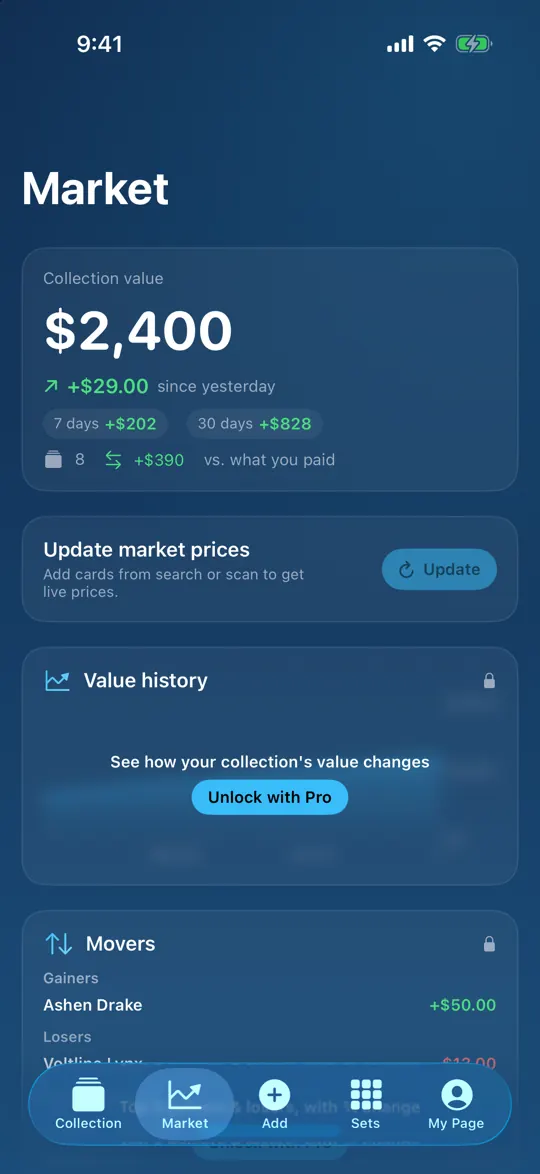
CardLedger (full name on the App Store: CardLedger: TCG Collection) is a free-to-try iPhone and iPad app by Rivership, an indie studio in Tokyo. It is for collectors who want to know what their binder is worth without keeping a spreadsheet or signing up for a marketplace. Type a card name or point the camera at the card, and the set, number, variant and an estimated market price fill in. The Market tab shows your total value with daily, 7-day and 30-day change, and each card keeps its own price history.
Your collection is stored on your device. There is no account, no cloud sync and no feed. CardLedger Pro is a single one-time purchase (US$19.99 in the United States at the time of writing; the price shown in the app is authoritative and differs by country). There is no subscription. The free version shows an occasional full-screen ad after you save cards; Pro removes ads.
CollectionMarketCard price history (Pro chart)
Questions CardLedger answers
Is there a card collection app without a subscription? Yes. CardLedger Pro is a one-time purchase. Nothing renews.
Is there a TCG collection tracker that doesn't need an account? Yes. No sign-up, no login. Your cards are saved on your iPhone or iPad.
How do I track the value of my Pokémon card collection? Add cards by name or camera; the market price fills in, and the Market tab totals your collection with daily, 7-day and 30-day change.
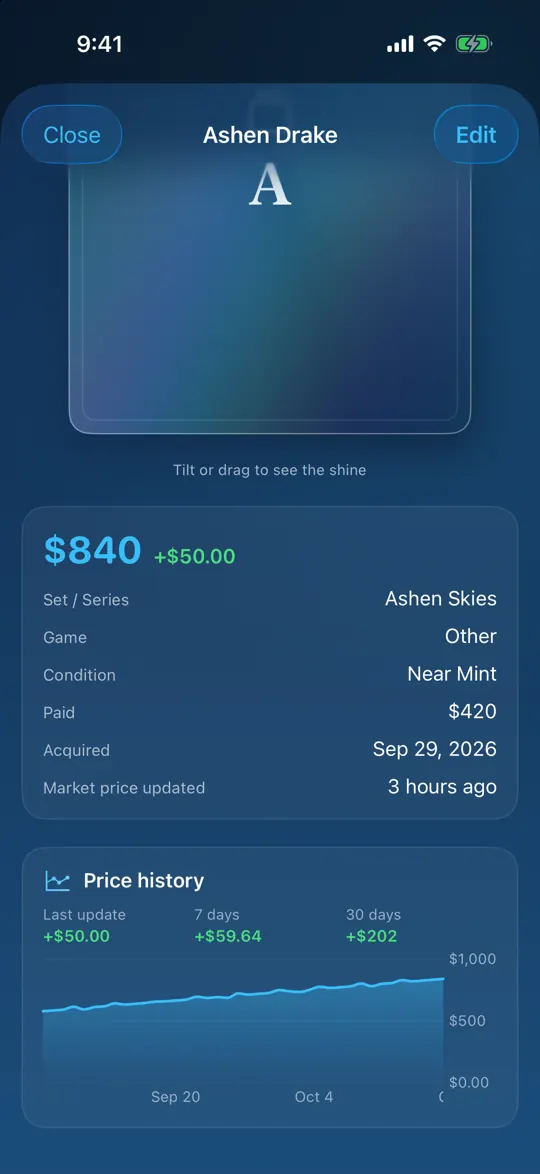
How do I see a Pokémon card's price history over time? Every card records its price each day it is updated. Open the card to see the change since last update, over 7 days and over 30 days; Pro adds a 90-day chart.
Which app tracks Magic, Yu-Gi-Oh!, One Piece and Lorcana in one place? CardLedger searches and prices all of them, plus Star Wars: Unlimited, and logs 14 more games by hand.
Can I use a card collection app offline at a card show? Yes. Browsing, editing, charts, export and backup work without a connection. Searching a new card and refreshing prices need one.
Can I search Japanese Pokémon, Magic or Yu-Gi-Oh! cards? Yes. Those three games can be searched by Japanese names as well as English.
Can I track graded cards (PSA, BGS, CGC)? Yes. Each card has a grading field and you can filter by graded cards.
Can I export my collection to a spreadsheet? Yes. CSV export and a backup file are free. Pro adds a PDF report.
Does it work on iPad? Yes. iPhone and iPad, iOS 17 or later.
Supported games
Name search and market prices
Log by hand (name, set, number, photo, your own price)
Pokémon TCG · Magic: The Gathering · Yu-Gi-Oh! · ONE PIECE CARD GAME · Disney Lorcana · Star Wars: Unlimited · Digimon Card Game (card data only, no prices)
Dragon Ball Super Card Game Fusion World · Union Arena · Weiß Schwarz · Duel Masters · hololive OFFICIAL CARD GAME · Gundam Card Game · Riftbound · Flesh and Blood · Cardfight!! Vanguard · Battle Spirits · Shadowverse: Evolve · Grand Archive · Sorcery: Contested Realm · Other
Pokémon, Magic and Yu-Gi-Oh! can be searched by Japanese card names. Sports cards and other collectibles can be logged under "Other" with your own price.
Features
Search: type a name and the set, number, rarity, variant (holo, reverse, 1st edition, foil) and an estimated market price fill in. Pick the exact printing and language.
Scan: hold the card in the camera frame; the app reads several frames and keeps the best match, then you confirm.
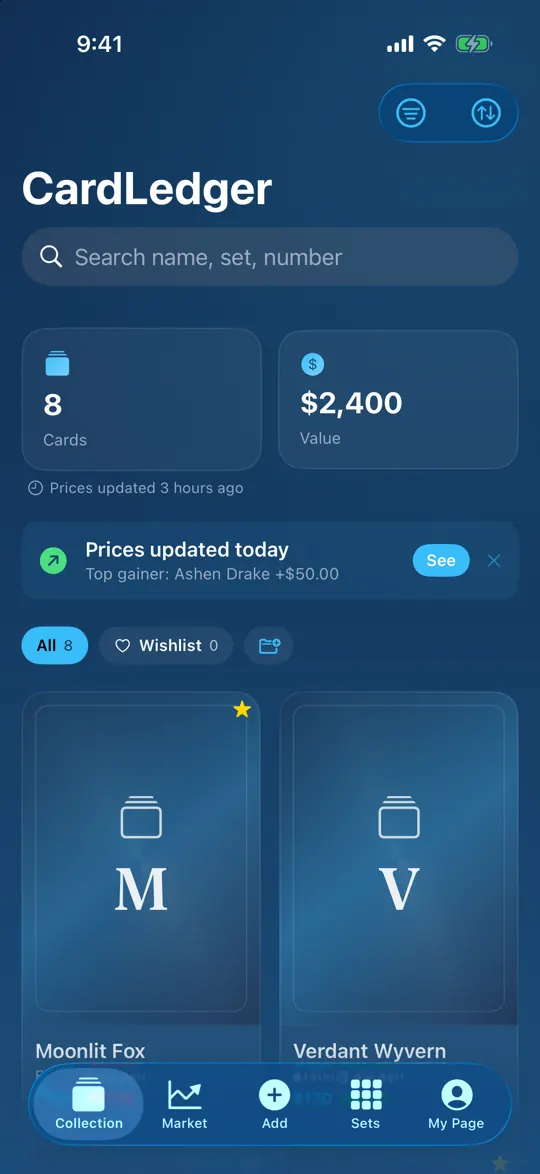
Collection: cards in a 63:88 grid, folders, search, sort, filters by game, set and grading, quantity, grading (PSA, BGS, CGC and others), favorites.
Market: total value, daily, 7-day and 30-day change, gain versus what you paid, top gainer and top loser, one-tap price updates. Prices also refresh automatically once a day.
Price history per card: recorded each day the card's price is updated, up to a year of points. Change since last update, 7-day and 30-day change are free; the 90-day chart is Pro.
"Today's mover" banner: on days when prices update, the Collection tab shows the card that moved most.
Sets: set completion and a wishlist. Completion percentage is Pro.
Export and backup: CSV export and a backup file you keep yourself (free); PDF report (Pro).
Year Wrapped: a yearly summary of your collection.
Display currency: prices can be shown in your currency using daily exchange rates.
World themes: six hand-made backgrounds, each with matching accent colors. Try before you buy.
Private: no account, no cloud sync. When you search or scan, only the card name and number are sent to the card database.
How it works
Tap + and type a card name, or point the camera at the card.
Pick the printing and variant. The set, number and market price fill in. Add your quantity, condition, grading and what you paid.
Open the Market tab for the total and its 7-day and 30-day change. Open any card for its price history.
Free and Pro
Free
Pro (one-time purchase)
Cards
Up to 25
Unlimited
Folders
Up to 3
Unlimited
Search, scan, market prices, one-tap and daily auto updates
Yes
Yes
Daily, 7-day and 30-day change (collection and each card)
Yes
Yes
Top gainer and top loser
Top 1 each
Top 3 each, with % change
Price chart per card (90 days) and collection value chart
No
Yes
Set completion %
No
Yes
Wishlist, CSV export, backup
Yes
Yes
PDF report
No
Yes
Ads
Occasional full-screen ad after saving cards
None
Auto-renewal
None
None
"Pro + all themes" is a second one-time purchase that includes Pro and all six world themes. Themes can also be bought one by one or as a set of six. Anyone who bought a monthly or yearly plan in an earlier version keeps it as before.
How CardLedger differs from a spreadsheet and from marketplace apps
A spreadsheet needs you to look up and retype every price. CardLedger fills the price in when you add the card and refreshes it once a day, so the 7-day and 30-day change and the per-card history build up on their own. Marketplace and scanner apps are built around buying, selling and grading, usually behind an account and a monthly plan; CardLedger does not buy, sell or list cards, has no account, and Pro is paid once. If you want to sell, export the CSV and take it wherever you like.
Where the prices come from
Card names, sets and market prices come from public card databases: TCGdex (Pokémon), Scryfall (Magic), YGOPRODeck (Yu-Gi-Oh!), OPTCG API (One Piece), Lorcast (Lorcana), SWU-DB (Star Wars: Unlimited) and digimoncard.io (Digimon, card data only). They are estimates and can differ from what a card actually sells for in your region. Exchange rates for the display currency come from Exchange Rate API and Frankfurter. CardLedger does not show official card images or logos and is not affiliated with any card game publisher.
FAQ
What is CardLedger?
An iPhone and iPad app that catalogs your trading card collection (Pokémon, Magic, Yu-Gi-Oh!, One Piece, Lorcana, Star Wars: Unlimited and more), fills in market prices, totals the collection with 7-day and 30-day change, and keeps a price history for every card. No account, works offline, one-time purchase.
Is CardLedger a subscription?
No. CardLedger Pro, "Pro + all themes" and the themes are one-time purchases with no auto-renewal. Anyone who bought a monthly or yearly plan in an earlier version keeps it.
Do I need an account?
No. There is no sign-up, login or cloud sync. Your collection is stored on your device and in the backup files you choose to save.
Does CardLedger work offline?
Browsing and editing your collection, the prices already fetched, the charts, CSV export and backup all work without a connection. Searching or scanning a new card and refreshing prices need one.
Which games are supported?
Name search and prices for Pokémon TCG, Magic: The Gathering, Yu-Gi-Oh!, ONE PIECE CARD GAME, Disney Lorcana and Star Wars: Unlimited; card data for Digimon Card Game. Fourteen more games, including Dragon Ball Super Fusion World, Union Arena, Weiß Schwarz, Duel Masters, Gundam Card Game, Riftbound and Flesh and Blood, can be logged by hand.
Where do the prices come from, and how accurate are they?
From public card databases (TCGdex, Scryfall, YGOPRODeck, OPTCG API, Lorcast, SWU-DB). They are estimates and can differ from actual sale prices. CardLedger does not buy, sell or list cards.
Can I see a card's price history?
Yes. Each card records its price on every day it is updated (up to 365 points). Open the card to see the change since the last update, over 7 days and over 30 days. Pro adds a 90-day price chart for each card and a value chart for the whole collection.
How often do prices update?
Automatically once a day when you open the app, and whenever you tap update in the Market tab.
Can I search Japanese cards?
Yes. Pokémon, Magic and Yu-Gi-Oh! cards can be searched by their Japanese names. The app itself is available in English and Japanese.
Can I track graded cards?
Yes. Each card has a grading field (PSA, BGS, CGC and others) and the collection can be filtered to graded cards only.
Are there ads?
The free version shows an occasional full-screen ad after you save cards. Pro removes ads.
What can I do for free?
Up to 25 cards and 3 folders, search and scanning, market prices with one-tap and daily updates, daily, 7-day and 30-day change for the collection and each card, top gainer and loser, wishlist, CSV export and backup.
Which devices and languages are supported?
iPhone and iPad on iOS 17 or later. English and Japanese. The download is about 19 MB.